One of the most thrilling moments in early game design is giving a video game a score! Whether counting collected gold coins, tracking player health, or timing a race, computers use variables to remember information. Our free printable scratch variables worksheets introduce second graders to data storage, score tracking, and arithmetic updates screen-free. Tailored for elementary computer science educators and parents across the United States, these worksheets make abstract algebraic variables tangible, fun, and easy to understand.
What Is a Variable in Elementary Computer Science?
A variable is simply a container with a name that holds a piece of information that can change. In Scratch 3.0, variables are represented by dark orange blocks located in the “Variables” palette. When children build games, they use blocks like set [score] to 0 and change [score] by 1. Practicing with **scratch variables worksheets** helps second graders understand that a variable is not just a mystery letter in math—it is a live memory slot that stores player progress.
By using **unplugged coding variables for elementary students**, children grasp the difference between setting a value (overwriting whatever was there) and changing a value (adding or subtracting from the existing amount). This distinction is one of the most common stumbling blocks for young programmers, and practicing it on paper prevents countless software bugs later on.
What’s Included in This Free PDF Pack?
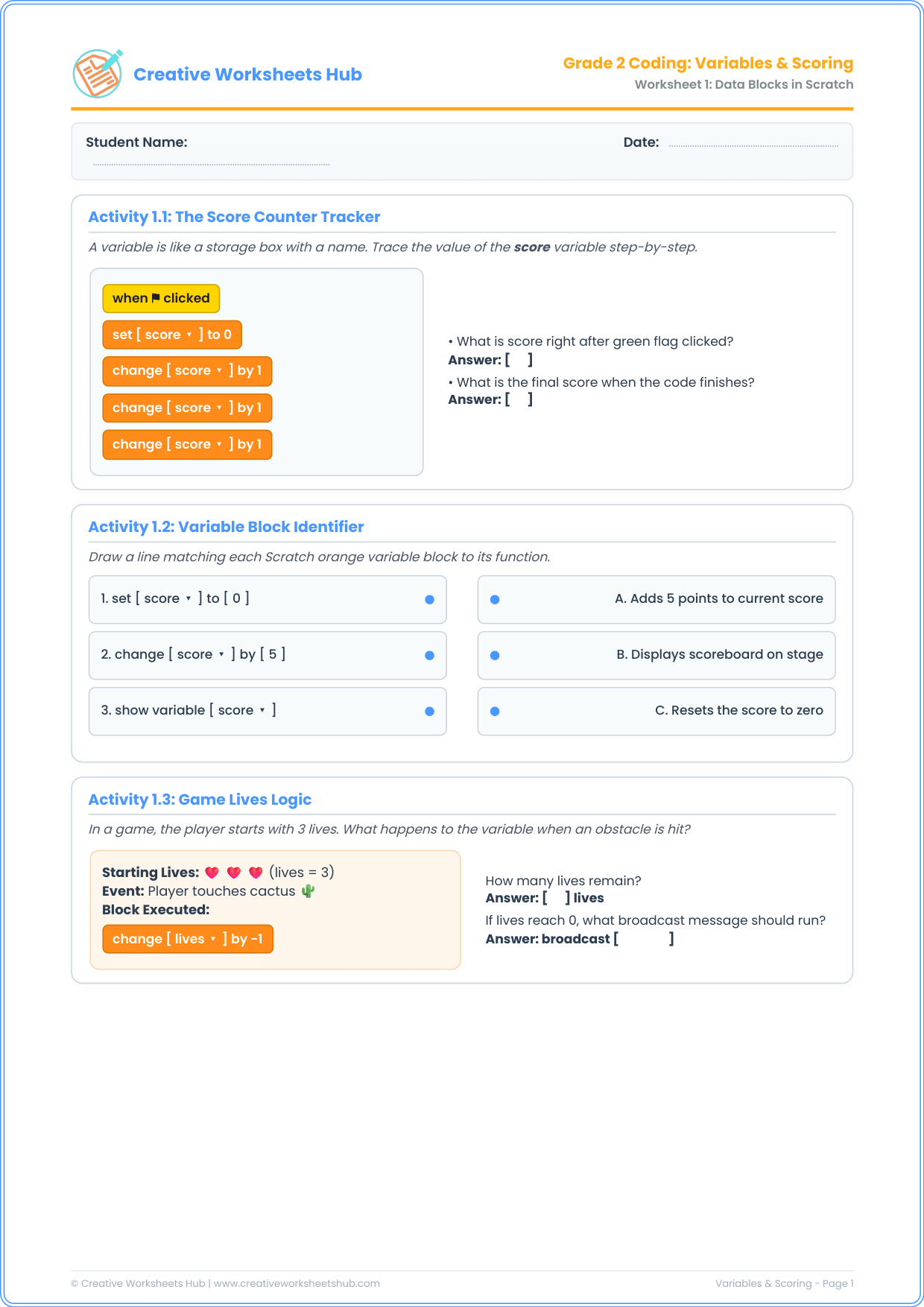
This pack features two comprehensive, classroom-ready A4 worksheets with 3 activities each (6 activities in total):
Worksheet 1: Data Storage, Scores & Game Lives
- Activity 1.1: The Score Counter Tracker — Students trace a script from start to finish, calculating how the score increases each time a point-scoring event executes.
- Activity 1.2: Variable Block Identifier — A matching exercise that connects
set to,change by, andshow variableblocks to their plain-English functions. - Activity 1.3: Game Lives Logic — Demonstrates negative changes (e.g., hitting a cactus decreases health by -1) and triggers game-over conditions when lives hit zero.
Worksheet 2: Coin Collection & Variable Math
- Activity 2.1: Coin Collector Algorithm — Explores conditional variables (e.g., if touching coin, increment coins by 5 and trigger sound effects).
- Activity 2.2: The Reset Rule Debugger — Challenges students to explain why initializing variables under the green flag is crucial to prevent score leakage between game sessions.
- Activity 2.3: Variable Math Table — A step-by-step data tracking table where students calculate the changing value of score across additions, gains, and penalties.
Classroom Guide: How to Teach Variables Unplugged
To deliver an impactful **teaching variables in scratch without computers** session:
- The Labeled Box Demonstration: Take a small cardboard box and tape a label that says “SCORE” on the front. Put 0 index cards inside. Each time a student answers a question, place another card in the box: “Change score by 1!” This physical analogy sticks instantly with young minds.
- Explain “Set” vs. “Change”: Show that “Set score to 10” means clearing the box and putting in 10. “Change score by 2” means keeping what you have and adding 2 more.
- Reinforce Initialization: In Activity 2.2, ask: “If you play a board game, do you start with your score from yesterday?” This simple real-world question demystifies initialization code.
Teacher & Parent Answer Key
Worksheet 1 Solutions:
- Activity 1.1: Score right after green flag = 0; Final score after three +1 blocks = 3.
- Activity 1.2: 1 (set score to 0) matches C (Resets the score to zero); 2 (change score by 5) matches A (Adds 5 points); 3 (show variable) matches B (Displays scoreboard).
- Activity 1.3: Remaining lives = 2 (3 – 1); Trigger message = broadcast [game_over].
Worksheet 2 Solutions:
- Activity 2.1: 3 coins × 5 points = 15 points; Sound effect = Coin.
- Activity 2.2: Correct choice is: So the player doesn’t start with their old score from the previous game.
- Activity 2.3: Step 2 score = 2; Step 3 score = 7 (2 + 5); Step 4 score = 4 (7 – 3).
Frequently Asked Questions (FAQs)
What is a variable in Scratch?
In Scratch, a variable is an orange data block that stores a changeable value, such as numbers (e.g., score, health, level) or text (e.g., player name).
What is the difference between ‘set variable’ and ‘change variable’?
‘Set variable’ assigns a specific exact number to the variable, wiping out any previous value. ‘Change variable’ adds to or subtracts from whatever number is already stored inside.
How do variables connect to elementary math standards?
Variables reinforce early algebraic thinking, basic addition, subtraction of integers, and data organization. They bridge the gap between concrete numbers and abstract symbols.
What CSTA standards do these worksheets satisfy?
They align with CSTA Standard 1B-AP-09: “Model the way programs store and manipulate data by using numbers or other symbols to represent information.” This standard is core to Grade 2–3 computer science in the US.
Are negative numbers covered in these worksheets?
Yes, in a gentle, intuitive way! Second graders learn that losing a life or losing points is represented in code as changing a variable by a negative value (e.g., -1 or -3).
How should I print these materials?
Click the download button above to retrieve the high-resolution PDF. It is ready for double-sided A4 printing and formats cleanly onto US Letter paper.