As early learning guidelines in the United States like the **CSTA K-12 Computer Science Standards** emphasize computational thinking, learning how to debug becomes a key modern skill. Our free printable unplugged coding debugging worksheets offer a screen-free way to teach kids how to spot mistakes, repair step-by-step sequences, and correct arrow-based maps. This guide is crafted specifically for parents, homeschoolers, and elementary teachers looking for high-quality **unplugged coding worksheets for kindergarten** to introduce foundational computer science without any screen time.
Why Teach Debugging to Kindergarteners?
Debugging is the process of finding and fixing mistakes in code. In computer science, errors are normal, and learning how to solve them builds resilience and patience. For a 5-year-old, learning to debug helps bridge the gap between simple spatial directions and structured logical thinking. By utilizing **kindergarten coding activities screen free**, children develop critical thinking habits early. They learn to look at a path, analyze where the instruction went wrong, and test new directions. This offline practice is perfect for building the problem-solving mindset needed for platforms like Scratch and Code.org later on.
In addition, teaching **how to teach debugging to kindergarten** students is much easier when you use familiar, real-world examples. Instead of computer syntax, we use directional arrow puzzles, maze pathways, and morning routines. When children see a squirrel hitting a tree, they immediately understand that the “code” did not work as intended. This is the exact definition of a software bug!
What’s Included in This Free PDF Pack?
This post includes two classroom-ready **unplugged coding game printable** pages with 3 activities each, designed to cover the page densely with engaging visual cards:
Worksheet 1: Spot the Bug & Arrow Logic
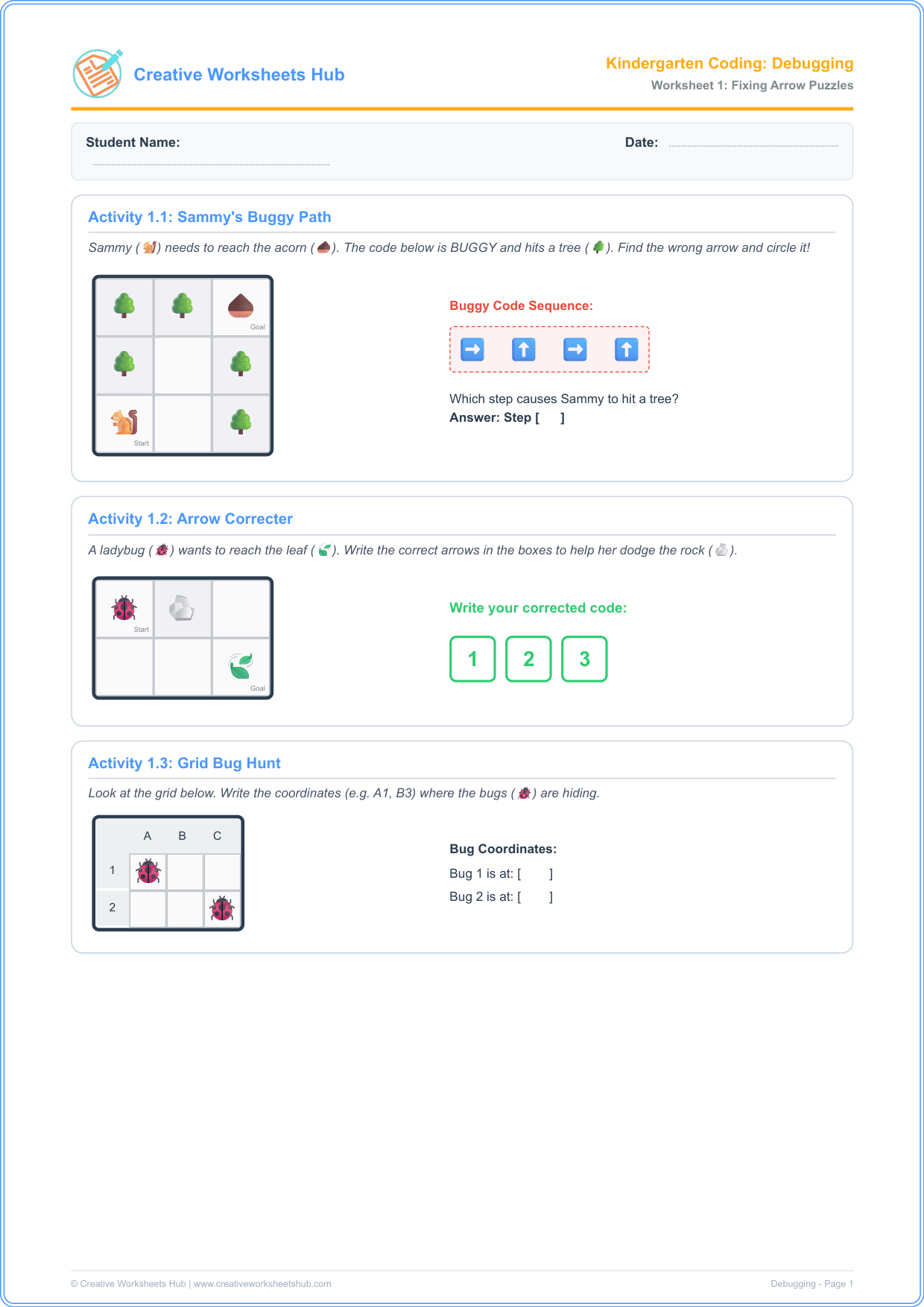
- Activity 1.1: Sammy’s Buggy Path — Find which command arrow causes Sammy the Squirrel (🐿️) to hit a tree obstacle (🌳). This teaches kids to trace code step-by-step.
- Activity 1.2: Arrow Correcter — Write the corrected arrow path to help Lilly the Ladybug (🐞) dodge a rock (🪨) and reach the leaf, showing how to rewrite incorrect instructions.
- Activity 1.3: Grid Bug Hunt — Find the coordinates (e.g. A1, B3) where the buggy beetles are hiding on a lettered coordinate grid, linking grid systems with debugging.
Worksheet 2: Sequence Repair & Everyday Algorithms
- Activity 2.1: Out-of-Order Routine — Write 1, 2, and 3 to fix a buggy morning handwashing routine, showing that algorithms require correct step sequencing to function.
- Activity 2.2: The Missing Sandwich Step — Solve the algorithm bug by finding the missing instruction to assemble a peanut butter sandwich.
- Activity 2.3: Fix the Bugs Match-up — Draw lines connecting coding bugs to their correct debugging actions, reinforcing logic matching.
Step-by-Step Guide for Teachers and Parents
To get the most out of these **elementary computer science worksheets**, we recommend running these activities as a guided lesson:
- Introduce the Concept: Explain that a “bug” is just a mistake, and debugging means fixing it. Tell the kids they are code detectives!
- Trace with Fingers: In Activity 1.1, have students place their finger on Sammy (🐿️) and move it step-by-step as you read the arrows aloud: “Right, Up, Right, Up”. When their finger hits the tree on step 3, ask them: “What did we hit? Why did it happen?”.
- Write the Solution: Have them write the correct arrows in the boxes in Activity 1.2. Encourage them to test their path with their finger to verify it works before writing.
- Connect to Routines: Talk about the handwashing routine. Ask: “Can we dry our hands before rinsing the soap? No, that’s a bug!”. This helps them connect coding to daily logic.
Teacher & Parent Answer Key
Worksheet 1 Solutions:
- Activity 1.1: The 3rd command arrow (➡️) is the bug; it runs Sammy into the tree. The correct sequence should turn up instead.
- Activity 1.2: Correct sequence is: ⬇️, ➡️, ⬇️ (or ➡️, ⬇️, ⬇️). Both paths successfully dodge the rock.
- Activity 1.3: Bug 1 is at A1, Bug 2 is at C2.
Worksheet 2 Solutions:
- Activity 2.1: Soap & wet hands (1), Rinse off (2), Dry hands (3).
- Activity 2.2: Correct missing step is: A (Put the two slices of bread together).
- Activity 2.3: Hits a rock ➔ rewrite arrows to dodge it; Out of order ➔ sort steps in sequence.
Frequently Asked Questions (FAQs)
What is debugging in computer programming?
Debugging is the process of finding and fixing mistakes (“bugs”) in a computer program. For kids, it teaches patience, resilience, and logical step-by-step checking.
How do these unplugged debugging tasks help children?
By reviewing pathways and step-by-step everyday routines offline, children build computational logic, fine motor skills, and error-analysis capabilities without screen-time distraction.
Are these worksheets aligned with US K-12 Computer Science Standards?
Yes! These activities align with CSTA Standard 1A-AP-14: “Debug (identify and fix) errors in an algorithm or program that includes sequential steps.” This is standard for US Kindergarten and Pre-K classrooms.
Do children need any prior coding knowledge?
No! These **unplugged coding debugging** worksheets are designed for absolute beginners. They rely on simple visual elements and icons, making them perfect for children who are still learning to read.
How can I print these worksheets?
Simply click the download button above. The files are compiled in high-resolution, print-ready A4 PDF format that fits standard letter size paper for easy printing at school or home.
Can these activities be used in coding centers?
Absolutely! Many US elementary teachers print these out, laminate them, and use them in screen-free coding centers with dry-erase markers for reusable learning.