Free Printable Coding Worksheets for Kids: Scratch & Blockly (Grades K-5)
In today’s digital age, computational thinking is becoming as fundamental as reading, writing, and basic arithmetic. While traditional curricula like STEM lay down the foundations for science and mathematics, introducing computer science and block-based programming early helps primary students develop critical problem-solving skills. Our Free Printable Coding Worksheets for Kids: Scratch & Blockly (Grades K-5) provide a hands-on, offline (“unplugged”) way to learn the core concepts of coding using ideas from popular platforms like Scratch, Blockly, and Code.org.
Whether you’re a teacher introducing STEM concepts in the classroom, a parent looking to supplement screen-free learning, or a homeschooler building an introductory technology unit, these worksheets make learning to code fun, intuitive, and accessible without needing a computer.
The K-5 Coding Progression: Building Blocks of Logic
Learning to code isn’t about memorizing syntax; it’s about learning how to break down complex problems into smaller, logical steps. By structuring our coding worksheets around the developmental milestones of primary students, we align with the CSTA K-12 Computer Science Standards:
Kindergarten (Ages 5-6): Directional Arrow Coding — Focuses on sequencing and spatial awareness. Students use simple command arrows (Up, Down, Left, Right) to guide characters through a grid map (like Code.org’s Happy Maps).
Grade 1 (Ages 6-7): Simple Sequences & Algorithms — Introduces the idea of an “algorithm” (a step-by-step set of instructions). Students write ordered lists of commands to complete a task and match icons to actions.
Grade 2 (Ages 7-8): Introduction to Loops (Repetition) — Teaches kids how to identify patterns and write shorter, more efficient code using “Repeat” blocks to avoid writing the same instruction multiple times.
Grade 3 (Ages 8-9): Events & Debugging — Students learn about “Events” (e.g., “When green flag clicked” or “When key pressed”) and practice finding errors (“bugs”) in simple sequences.
Grade 4 (Ages 9-10): Conditionals (If-Else) — Introduces decision-making logic. Students solve pathways where characters must choose a path based on conditions (e.g., “If path is clear, move forward; Else, turn left”).
Grade 5 (Ages 10-11): Variables & Input — Bridges unplugged concepts to active Scratch programming. Covers using variables to keep track of scores, timers, and simple mathematical operations.
How We Design Unplugged Coding Worksheets
To make these worksheets highly engaging and visually descriptive, we draw design inspiration directly from Scratch and Code.org. The worksheets include:
Visual Block Outlines: Worksheets feature commands styled as jigsaw puzzle pieces. Just like Scratch, kids can see that a Repeat block wraps around action blocks, helping them visualize program flow.
Grid-Based Pathfinding: Clear, kid-friendly maps containing sprites, obstacles (like trees or walls), and goals (like a banana or a chest) that make coding concrete.
Interactive Code Tracing: Students act as the computer, tracing a given set of blocks with their finger or pencil to draw a path and find the final landing spot.
“Spot the Bug” Challenges: We present a path and a block sequence that has a mistake. Kids must find the mistake, circle it, and write the corrected code.
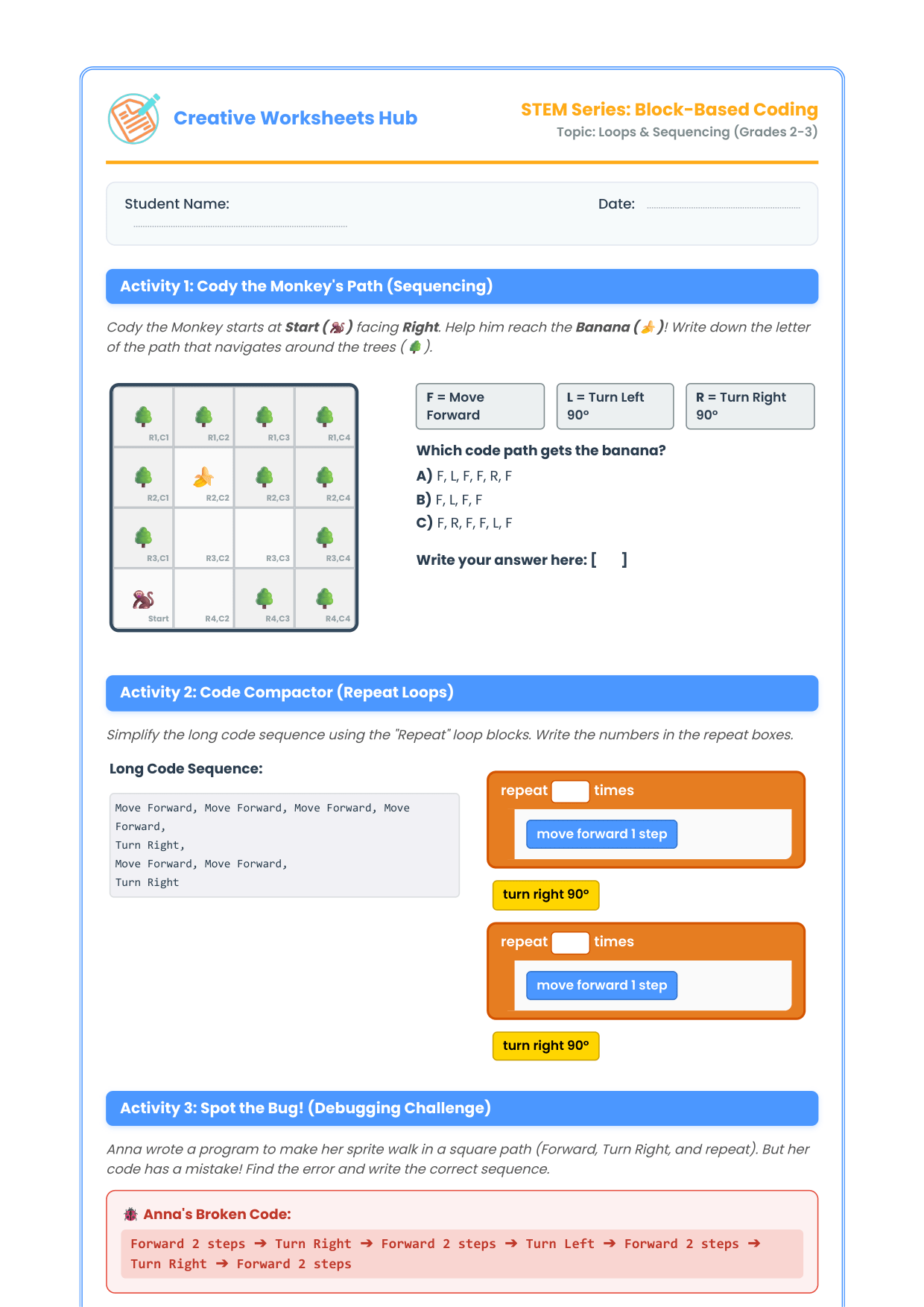
Draft Worksheet Preview: Grade 2-3 Loops & Sequencing
Below is a full draft of the worksheets included in our free printable package. It focuses on loops, sequencing, and basic debugging.
Activity 1: The Monkey’s Path (Sequencing)
Instructions: Help Cody the Monkey reach the banana! Look at the grid below. Cody starts at Start (S) facing Right. Write the letter of the correct command sequence to get Cody to the Banana (B) without hitting the trees (🌳).
The Grid Map:
[ Row 1 ]  🌳   |   🌳   |   🌳   |   🌳
[ Row 2 ]  🌳   |  [ B ] |   🌳   |   🌳
[ Row 3 ]  🌳   |  [   ] |  [   ] |   🌳
[ Row 4 ] [ S ] |  [   ] |   🌳   |   🌳
          Col 1   Col 2   Col 3   Col 4
Commands Available:
• F = Move Forward 1 Step
• L = Turn Left 90° (turn in place)
• R = Turn Right 90° (turn in place)
- Which sequence gets Cody to the Banana?
A) F, L, F, F, R, F
B) F, L, F, F
C) F, R, F, F, L, F
Activity 2: The Code Compactor (Using Repeat Loops)
Instructions: Repeating the same instruction over and over makes code long and messy. A Repeat Loop runs a block of code multiple times. Look at the long sequence of commands and rewrite it using the Repeat Loop block below.
Long Code:
Move Forward, Move Forward, Move Forward, Move Forward, Turn Right, Move Forward, Move Forward, Turn Right
1. Complete the loop block:
┌──────────────────────────┐
│  REPEAT [ ____ ] TIMES   │
│  ┌─────────────────────┐ │
│  │   Move Forward      │ │
│  └─────────────────────┘ │
└──────────────────────────┘
  Turn Right
┌──────────────────────────┐
│  REPEAT [ ____ ] TIMES   │
│  ┌─────────────────────┐ │
│  │   Move Forward      │ │
│  └─────────────────────┘ │
└──────────────────────────┘
  Turn Right
Activity 3: Spot the Bug! (Debugging Challenge)
Instructions: Anna wrote this program to make her character walk a square path: Forward 2 steps, Turn Right, Forward 2 steps, Turn Left, Forward 2 steps, Turn Right, Forward 2 steps. But the character didn’t walk a square!
1. Find the incorrect command (“the bug”) in Anna’s code and write the corrected command sequence below:
Anna’s Code: Forward 2, Turn Right, Forward 2, Turn Left, Forward 2, Turn Right, Forward 2
Activity 4: Scratch Blocks Match-up
Instructions: Draw a line to match each block to its correct description.
[ BLOCK SHAPE ]                      [ WHAT IT DOES ]
1. "When Green Flag Clicked"  ───►   A. Repeats commands inside it.
2. "Move 10 Steps"            ───►   B. Starts the script when run.
3. "Repeat 5"                 ───►   C. Moves a sprite forward.
4. "Say Hello for 2 Secs"     ───►   D. Displays a speech bubble.
Answer Key & Solutions
Activity 1: The Monkey’s Path
Correct Answer: B (F, L, F, F)
• Cody moves forward 1 step (reaches Row 4, Col 2).
• Cody turns Left (now facing Up).
• Cody moves forward 2 steps (Row 3, Col 2 then Row 2, Col 2 – where the Banana is!).
Activity 2: The Code Compactor
Correct Answers:
• Repeat 4 Times (Move Forward)
• Turn Right
• Repeat 2 Times (Move Forward)
• Turn Right
Activity 3: Spot the Bug!
The Bug: The second turn is a “Turn Left” instead of a “Turn Right”. To draw a square, all turns must be in the same direction.
Corrected Code: Forward 2, Turn Right, Forward 2, Turn Right, Forward 2, Turn Right, Forward 2
Activity 4: Scratch Blocks Match-up
Correct Matches:
• 1 matches B (Starts the script)
• 2 matches C (Moves a sprite forward)
• 3 matches A (Repeats commands)
• 4 matches D (Displays speech bubble)
Download the Free Printable Pack (PDF)
Get the complete, high-resolution printable PDF featuring custom borders, code block illustration sheets, and unplugged classroom activities.
Tips for Parents & Teachers: Teaching Coding Unplugged
Teaching programming without a screen can feel counterintuitive, but it’s highly effective for young minds. Here are three quick tips to maximize these worksheets:
- Be the Robot: Have students act out command sequences physically. Tape a grid on the floor and have one student act as the “Robot” while another reads the “code commands” out loud. This physical connection reinforces spatial awareness.
- Embrace the Bug: In computer science, mistakes (“bugs”) are normal parts of learning. Frame debugging as a detective game. Celebrate finding and fixing bugs!
- Connect to Scratch: After completing the worksheets, open Scratch (scratch.mit.edu) and show them the exact same blocks in action. Seeing paper logic come to life on screen is incredibly rewarding.
Frequently Asked Questions
Do kids need a computer to do these coding worksheets?
No! These are “unplugged” coding worksheets designed to be completed with just a pencil. They are perfect for screen-free classroom learning, homework, or travel activities.
What grades are these coding worksheets designed for?
The worksheets in this pack cover Grades K through 5 (ages 5-11). We start with simple directional arrows for Kindergarten and transition to loop blocks and debugging by Grades 2-3, ending with variables and basic events for Grades 4-5.
Can I print copies for my whole classroom?
Yes, teachers and homeschool educators are welcome to download and print as many copies as they need for their students. We only ask that you link back to this post rather than distributing the PDF directly online.
More Free Printable Worksheets
Looking for more STEM and primary worksheets? Check out these popular free resources:
- 📖 Daily Reading Log & Book Review Template (Grades 1-3) — Help build daily reading routines!
- 📋 Classroom Rules Poster & Social Contract (Grades K-5) — Perfect for back-to-school season!